General Application | |
| Version 1.5.2 includes significant improvements to the Cipher multi-tenant use of memory and the performance of the data ingestion from sensors to the cloud. |
Flowlink Cipher 1.5
This section describes all changes made to the application in the 1.5 series of releases.
1.5.2
September 2023
Maintenance
Flowlink Cipher
General Application | |
| Version 1.5.2 includes significant improvements to the Cipher multi-tenant use of memory and the performance of the data ingestion from sensors to the cloud. |
1.5.1
June 2023
Maintenance
Flowlink Cipher
General Application | |
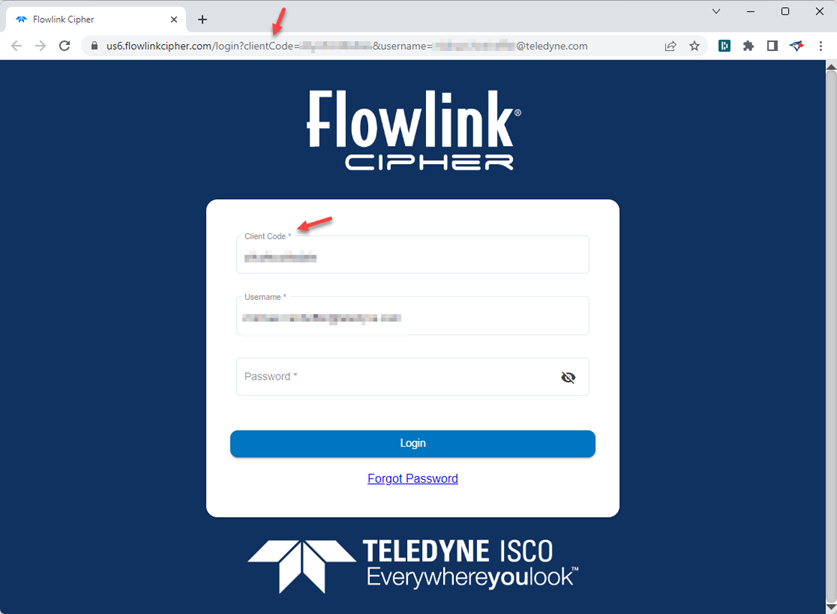
| The email invitation sent to new users to create a new account now has the correct URL in the link to start the new account setup procedure. Previously, the link included a 'tenant' value in the URL, which was incorrect. The URL now correctly uses a 'clientCode' value, which auto-populates the Client Code field on the login screen.
|
Tenants | |
| Since the introduction of the multi-tenant deployments, users were able to log into a customer tenant after the license expiry date for the tenant had passed. This has been fixed. |
User Accounts | |
| Since the introduction of the multi-tenant deployments in Flowlink Cipher 1.5.0, new users created with uppercase letters in the username have experienced errors when attempting to create graphs from a template. The case sensitive handling of the username resulted in roles being applied to the account incorrectly, which in turn caused problems in graph creation. This has been fixed. |
1.5.0
May 2023
General Notices
☼ Flowlink Cipher 1.5.0 introduces the use of a Client Code to the login procedure for users. When accessing the system by selecting a bookmark in your web browser or entering your previous URL, the following screen will appear that will redirect you to a new web address (URL) for your deployment of Flowlink Cipher 1.5.0. Remember to bookmark the new address in your browser.

Enhancements
Flowlink Cipher
General Application | |
| The login page for Flowlink Cipher now contains a field for the user to enter a Client Code. Previously, users would identify their organization with a sub-domain prefix on the URL for the website. The sub-domain has been replaced with the Client Code field on the login page.
|
Settings | |
| The Client Code that was used to log into Cipher is now displayed in the Settings > General screen.
|
Maintenance
Flowlink Cipher
Alarms | |
| An internal server error was sometimes occurring when unsubscribing from an Alarm Setting. This has been fixed. |
Dashboard | |
| Battery gadgets were displaying the voltage as "N/A" when a site had more than one voltage. The voltages are now displayed correctly on the gadget.
|
Scheduler | |
| Previously, when defining a new job in the Scheduler, the site selection field would automatically clear the selected site from the field before the user was able to finish and create the new scheduled job. This has been fixed. |
| The Scheduler has improved handling for reports that fail due to errors in the backend services. When a report fails, the Scheduler will now put the report job back into the queue to be executed again. Also, it is now recommended that jobs be scheduled to start at least 1 minute apart when defining multiple jobs to be executed at the same time. This provides sufficient time for the email service to handle a large queue of near simultaneous reports. |
Sites | |
| Previously when importing a CSV file that contained data for more than one device, the data for the first device only would be imported. This has been fixed. |
| The Sites screen now correctly maintains the current filtering of the site cards when the site data is updated in the background. Previously when filtering was applied to the list of site cards and the processes which maintain the site information would update the page, the filtering would be removed and the full site list displayed. |
| When Flow Rate is included in a graph, the PDF generated from the Export Graph to PDF function will now contain a separate row in the summary table with Volume computed from Flow Rate. The units for Volume will be the user account preference for Volume units. |
Tenants | |
| Previously a user account in a tenant was able to see the Tenants table in the Settings menu. The Tenants tab in Settings is no longer available for users in tenants. |
User Accounts | |
| Previously, the Site Export function required selecting a unit for some of the datasets that may be included with a site. This most frequently occurred with Percent type datasets where the unit type "%" was not selected by default. To automate this when possible, the Preferences tab of the User Profile page now has a default unit selected for the following data types: Percent, FlagEvent, ProgramReportEvent, HistoryEvent, SummaryReportEvent, DiagnosticEvent, and Area. |