Flowlink Cipher 1.0
This section describes all changes made to the application in the 1.0 series of releases.
1.0.8
July 30 2021
Enhancements
Flowlink Cipher
IPReceiver | |
| To improve traceability of the data ingestion process, the timing information in the logs has been upgraded to include milliseconds. |
Logging | |
| Additional messages have been added in the log files during data ingestion to allow for profiling of the ingestion timings when running in production. |
Maintenance
Flowlink Cipher
Alarms | |
| Some sites were experiencing an ingestion failure if a device was experiencing an on-going alarm at the time of ingestion and the data triggered the alarm at the last data point. This has been fixed. |
IPReceiver | |
| Improvements were made to the logging for data ingestion failures. |
1.0.7
May 20 2021
General Notices
☼ It is now possible to rename a device in Flowlink Cipher. It is important to note that the new name will only be applied in Cipher and will not be applied to the meter. Therefore, the next time the meter pushes new data, a new device will be created in the site with the original name which still exists in the meter. The result will be a break a continuity of the datasets that belong to the device. Previous data for the device will still exist in Cipher as the renamed device, while all new data from the device going forward will exist with the original device name.

☼ It is now possible to rename a site in Cipher. It is important to note that the new name will only be applied in Cipher and will not be applied to the meter. Therefore, the next time the meter pushes new data, a new site will be created in Cipher with the original name because that site name no longer exists in Cipher. The result will be a break in continuity of the data. Previous data will be held in Cipher as the renamed site, while all new data going forward will exist in Cipher with the original site name.

Enhancements
Flowlink Cipher
Events | |
| The event type BottleSample has been renamed as Sample. |
Graphs | |
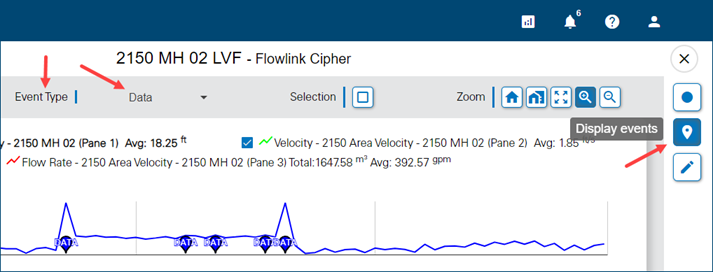
| The display of events on a graph in the main graph screen has been updated. The Toggle Events button has been renamed to Display Events with a new tooltip. When this button is set to On, a new Event Type tool is displayed above the graph. This tool can be used to select the types of events to be displayed on the graph; multiple types can be selected.
|
IPReceiver | |
| Error handling in data ingestion has been improved with new responses when errors occur. Information in the logs has also been improved. |
Sites | |
| The check box button on site cards in the Sites page has been updated. The tooltip for the button is now "Activate / Deactivate". Deactivating a site will now display a confirmation message which requires the user to confirm the deactivation of the site. Also, attempting to activate a site that would exceed the site license limit will now display a message indicating that the site limit has been reached.
|
Tenants | |
| The site count limit for a tenant is now being enforced during the creation of new sites via data ingestion with the IPListener and the importing of CSV files. Previously, the site count limit was only being enforced when the user attempted to manually assign an existing site to a tenant. |
Maintenance
Flowlink Cipher
API | |
| When an alarm triggered at a meter was ingested into Flowlink Cipher, there was an attempt to generate a notification which was failing. Cipher will now ignore the ingested alarm and not attempt to send a notification. |
General Application | |
| The email address for the Submit Feedback function has been updated to Iscowatersupport@teledyne.com |
Graphs | |
| The Horizontal Lines graph display properties are now being respected and the horizontal lines are displayed correctly in the graph. |
| When moving the cursor over a graph in the main graph screen or a graph gadget on the dashboard, the tooltip now displays the name of the dataset and the data values as expected. Previously, an internal ID was also appearing which has been removed. |
1.0.6
April 14 2021
Enhancements
Flowlink Cipher
Alarms | |
| The Severity parameter that was available when defining a new alarm has been removed as it is not used when alarms are triggered and displayed to the user. |
General Application | |
| A button for downloading log data to a text file is now available in the following locations: - the Logs tab of the site information page - the System Log tab of the Settings page - the Log Files tab of the Settings page |
| A new Job Queue system has been added to Flowlink Cipher. A new button has been added to the toolbar in the top-right corner of the page that shows the jobs the current user has in the queue. This button is only visible to users with the Site Manager role. Importing a CSV file will create a new job in the queue. Clicking the Job Queue button will display the status of each job the user has created. Once is a job is complete, a notification will be sent to the user indicating success or failure. |
| New Graph options have been added to the Preferences tab of the User Profile page to define the week day to use for the start of the week, and the time to use for the start of the day. These settings are applied to the relative graph choices for the time range of a graph. |
Graphs | |
| A checkbox has been added to the graph's legend that can be used to temporarily turn a dataset off in the graph with one click, without removing the dataset from the graph layout. |
| The following choices have been added to the list of Relative graph time extents: Today, Yesterday, This Week, Last Week, This Month, Last Month. These options use the new Graph user preferences that define the day for the start of the week and the time for the start of the day. |
Map | |
| The Map page now has an option to display or not display inactive sites. The option is off by default leaving only the active sites displayed on the Map. |
Sites | |
| The list of datasets available for each device is now available on the Devices tab of the site information page. |
| The properties of a dataset are now available in the Devices tab of the site information page. This includes: Dataset name, Data type, Data start time, Data end time, and Number of data points. |
Tenants | |
| Changing the tenant for a site can now be performed in two locations: - In the General tab of the site information page: Select the Edit button to enter edit mode and use the Change Tenant button in the Tenant section. - In the Sites page: Hover the cursor over a site card and click the Change Tenant button in the drop-down panel that is displayed. |
Maintenance
Flowlink Cipher
API | |
| Accessing the subscription through the API now requires authorization. |
Computed Datasets | |
| The dialog box used for picking the dry period time range for a DryFlow computed dataset has been repaired and will now load the graph with the flow rate dataset. |
Graphs | |
| When two quantities that have the same unit are added to a graph panel and one of those quantities is set to display inverted, the graph will now display as expected. |
Import | |
| A job queue system has been created to organize the data-import jobs submitted through the data ingestion API or via the Flowlink Cipher user interface. The job queue maintains the following information for each job: - a unique identifier (ID) - the user who submitted the job - the site and tenant to which data is being imported - a timestamp of when the import was performed During processing, the queue service will maintain a record with the current state of the job, which is available in JSON format at a URL. |
| Large CSV files that previously failed to import are now importing successfully due to the new job queue system that is managing the importing of the CSV files in a background process. |
Sites | |
| The filtering and sorting of the site cards on the Sites page is now maintained when the sites cards update. Previously, as the system was updating the cards with the latest data, the filtering and sorting would return to defaults. |
| The sorting of the site cards is now maintained when the tenant of a site is updated on the Sites page. |
Tenants | |
| The site count limit for a tenant was reverting to zero when the tenant color was changed in the Tenants tab of the Settings page. This no longer occurs. |
1.0.5
March 23 2021
Enhancements
Flowlink Cipher
API | |
| Error messages returned by the API have been improved for when the site limit count has been reached and when data is received for a site that is inactive. |
General Application | |
| When a user logs in to a new version of Flowlink Cipher for the first time, a notification message will now appear with the version number and a link to the Release Notes. |
| A Download Log File button is now available in the System Log and Log Files tabs of the Settings page, as well as the Logs tab in every site information page. This button can be used to download the log information to a text (.txt) file. |
Graphs | |
| The time range of data available when viewing a graph in the main graph page is no longer limited by the initial time range defined in the Configure Graph page. The user can now create a new graph with a limited time range and then, in the main graph page, use the navigation bar to page through all of the data in the database. This is because the main graph page now has the ability to retrieve data from the database dynamically. There is also a thin horizontal animation that appears on the graph page when data is being retrieved from the database. |
Sites | |
| Filtering and sorting options on the Sites page have been enhanced. - The site cards can now be filtered by name, tenant and group. - The site cards can now be sorted, ascending or descending, by name, tenant, alarms and voltage. |
| Searching for sites by site name can now be executed by pressing the Enter key. |
Tenants | |
| On the site information page, the control to change the tenant for the site has been moved from the upper-left corner of the page to the General tab, below the Coordinates section. |
| The site count limit for the Global tenant is now displayed as the site license limit for the Cipher instance minus the sum of active sites in other tenants. The expiry date for the Global tenant is now the same as the expiry date for the Cipher instance site license. |
| A user account that is assigned to a tenant will no longer see the Filter by Tenant control on the Sites screen as the user only has access to the sites in their tenant. |
| A site that is inactive can no longer be re-activated if it is in a tenant and the number of active sites in the tenant has already reached its maximum. |
| A tenant can now be deleted. When a system administrator confirms the deletion of a tenant, all sites and user accounts associated with the tenant are deactivated and transferred to the "Holding Tank", and then the tenant is deleted. |
Maintenance
Flowlink Cipher
Graphs | |
| Public graphs created with an account in a tenant are now appearing on the Analysis screen as expected. |
| The "Select points by rectangle" tool is now correctly selecting points in a scatterplot graph. |
Sites | |
| The Groups page for Sites is now correctly handling access to sites when the user is in a tenant. Users in a tenant can only see site groups that were created in the same tenant. Users not assigned to a tenant (i.e. Global users) can see site groups created by other Global users. |
| The following sorting and display options are now remembered during the user's current session: - Sites page: sort type, sort order and Include Inactive Sites option - Alarms page: Show Inactive Alarms option - Analysis page: sort type, sort order and Show Public Graphs option - Users page: Show Inactive Accounts option |
| When a user changes the active/inactive setting of a site, the site list is now updated automatically so that the correct list of sites is displayed when returning to the Sites page. |
Tenants | |
| Accounts with the Administrator role are no longer able to create and modify tenants, or assign sites and accounts to tenants. Tenant management is restricted to accounts with the System Administrator role. |
| On the Sites page, the tenant indicator on a site card is now updated when a change is made to the site's assignment to a tenant. |
1.0.4
February 10 2021
Enhancements
Flowlink Cipher
Alarms | |
| An alarm setting that is defined with multiple conditions is now working as expected. - When two conditions are defined with the AND operator, the alarm will remain active until either condition is no longer met. - When two conditions are defined with the OR operator, the alarm will remain active until both conditions are no longer met. |
API | |
| An API has been created for downloading data from the Flowlink Cipher database. The API has methods for downloading sites, devices and quantities. |
Dashboard | |
| The dashboard the user selects for viewing is now stored in the browser. The stored dashboard will be displayed automatically when the user returns to the Dashboard screen. |
Events | |
| The Event dialog box in the Alarms screen and the Event tab of the site information screen, has been resized to provide more room for the event message details. |
Notifications | |
| Email notifications will no longer be sent to a user's email account when the Email Notification option in the user's profile is turned off. Previously, notifications were still being sent for sites that had stopped pushing data to Cipher. |
Sites | |
| New controls have been added to the Sites screen: - The Filter by Tenant field can be used to filter the list of site cards by entering the name of a tenant. - The Sort by Tenant button can be used to sort the site cards by the tenant names. |
Tenants | |
| Tenants can now optionally include an expiry date. When the expiry date is reached, sites and users can no longer be assigned to the tenant, and users in the tenant can no longer login. Data will continue to be ingested for the sites in the expired tenant. |
| When a site is assigned to a tenant, the name of the tenant is now visible on the General tab of the site information screen. |
| Tenant names have been removed from the site cards. Tenants can now be defined with a color. This color is applied to the site symbol on site cards, allowing the tenant color to be used to identify which sites belong to each tenant on the Sites screen. |
| A user account can no longer be assigned to a tenant if the account contains the System Administrator role because the account would then have the ability to remove itself from the tenant and gain access to all data in the instance. An account with the Administrator role can be assigned to a tenant. |
| Tenants can now be defined with a limit of the number of active sites in the tenant. The total of active-site limits for all tenants cannot exceed the active-site licensing limit for the Flowlink Cipher instance. |
| The name of the tenant that a site belongs to is no longer displayed on the site card as a prefix of the site name. |
| The table in the Tenants tab of the Settings screen now includes the number of active sites in each tenant. |
Maintenance
Flowlink Cipher
Alarms | |
| The Event details dialog box is now showing the correct start conditions for a multi-condition alarm. Previously the first start condition was being repeated in the second and additional start conditions. |
| When defining conditions for a new alarm setting, if a digit was not entered before the decimal point in the alarm condition, the alarm setting could not be saved. This has been fixed. |
General Application | |
| Multiple screens in Flowlink Cipher are now loading faster and more reliably due to changes made at the database level for how the system responds to requests from the user. Previous issues with the Map and Sites screens responding slowly, or not at all, should now be improved. |
Graphs | |
| The selection of points in a graph and its data table has been fixed. The following methods are now working as expected: - selecting a single point in the graph - selecting multiple points using the Ctrl key - selecting a range of points using the Shift key - selecting points in the graph and the points being highlighted in the table - clicking in the white space between the legend and the graph to clear the selection |
Sites | |
| The time required to retrieve the list of sites and populate the Sites screen has been significantly reduced to a few seconds from, in some cases, a minute or more. |
| Previously when adding sites to a tenant, the sites were not available on the Groups screen. This has been fixed. Sites in a tenant can now be grouped. |
Tenants | |
| System Administrators will no longer see the prefix "Global" in the site card names for those sites that have not been assigned to a tenant. |
1.0.3
January 18 2021
Enhancements
Flowlink Cipher
Graphs | |
| The display properties for each dataset in a graph now include an option to define one or more horizontal dashed lines to be added to the graph as visual aids when monitoring the data from a site. The dashed lines will have the same color as the time series data for the dataset. |
Maintenance
Flowlink Cipher
Export | |
| Zero values for data points in a graph are now exported as zero values in CSV format. Previously, the zero values were being exported as empty (null) fields in the CSV format. |
| Timestamps that are ingested into the Cipher database are stored using the time reference of the device with which they were recorded and are never shifted to the UTC time standard of the database, however, the Export to CSV function was applying a local UTC offset shift when exporting timestamps. This has been corrected and timestamps are now exported to CSV using the time reference with which they were recorded from the device. |
General Application | |
| Unique naming of tenants is now enforced. It is no longer possible to create duplicate tenant names. |
| Having multiple tenants with the same name in the demo.flowlinkcipher.com instance was causing problems with the Sites, Map and Users screens. The unused duplicate tenants were removed from the database and the creation of new tenants will now enforce unique naming of tenants. |
Graphs | |
| Selecting a point in a scatterplot now works as expected. Previously, as the cursor moved through the data, multiple points were highlighted along the vertical line that follows the cursor. When the user clicked the mouse button to make a selection, the point closest to the cursor would sometimes not be the point selected. The selection of a single point in a scatterplot now selects the highlighted point closest to the cursor. |
1.0.2
December 15 2020
Enhancements
Flowlink Cipher
General Application | |
| A count of the number of cards on the Users, Sites, and Analysis screens has been added. As the user filters the list of cards, the count will update. |
| A user with the System Administrator role must confirm the enabling of tenancy for the instance of Cipher. Once enabled, the tenancy system cannot be disabled. |
Graphs | |
| In the main graph screen of a scatterplot, the name of the Best Fit Curve currently displayed now appears in the drop-down list of available curves. |
| The tooltip in the scatterplot graph now correctly shows the value for only the nearest point to the cursor. |
| The Analysis page now has sorting options: - "Sort by Name" sorts the list of graphs alphanumerically 0-9 a-z. - "Sort by Creation time" sorts the list based on the creation date of the graphs, starting with the most recent graph and ending with the oldest graph. |
| The Best Fit Curve in a scatterplot graph is now computed using only the data points visible in the graph. As the user zooms in and out of the scatterplot, the Best Fit Curve is recomputed. |
| When editing a scatterplot graph, the horizontal Fit to Limit and Fit to Center functions are now computing the correct intersection. If there is no intersection in the current view, a message is displayed. |
| A Best Fit Curve can now be deleted from the drop-down list of available Best Fit Curves. |
Map | |
| The tooltip for the site icons on the Map screen now includes the Alarms icon. This new icon provides menu options for accessing the Alarms screen and for acknowledging all alarms. |
User Accounts | |
| When a user account is assigned to a tenant, the name of the tenant is now displayed on the user account card in the Users screen. |
Maintenance
Flowlink Cipher
Graphs | |
| Selecting a Best Fit Curve for a scatterplot will now correctly be applied to the data currently in view. Previously, the Best Fit Curve was re-applying polynomial data that was recorded when the curve was initially created. |
| The Export to CSV function no longer fails when there is more than one dataset in a single pane in the graph. |
| In the main graph screen for a scatterplot, the Full Extent function will now zoom out to include all data within the time range defined for the graph. |
| The precision settings for the datasets in a scatterplot are now correctly applied in the scatterplot for the tooltip, the data table, the Y-axis labels, and the CSV export. |
| In the main graph screen for a scatterplot, when a new Best Fit Curve is created it will now appear in the drop-down list of available curves without requiring a refresh of the screen. |
User Accounts | |
| In the Users screen, filtering user account cards by entering text contained in the account email addresses is now working as expected. |
1.0.1
November 25 2020
General Notices
☼ Online Help for Flowlink Cipher is now available at help.flowllinkcipher.com which can be accessed directly without login to Cipher.
☼ Release Notes for Flowlink Cipher are now available at releasenotes.flowllinkcipher.com which can be accessed directly without login to Cipher.
Enhancements
Flowlink Cipher
Alarms | |
| The user can now quickly access active data alarms in three locations: - The alarm icon in the lower-right corner of a site gadget on the dashboard, which provides the Go to Alarms menu function. - The alarm icon on a site card in the Sites > List screen. - The alarm icon on the tooltip for a site on the Map screen. |
| The table in the Alarms screen is now sorted by Start Time descending. |
| The Alarms Settings screen has been updated to allow alarms to be disabled. A new Show Inactive Alarms option can be used to show or hide disabled alarms. Also, an alarm setting can now be edited if no alarms have been triggered by the setting. Once a setting has triggered an alarm, the setting can no longer be edited. |
Computed Datasets | |
| In the DryFlow function the dialog box for picking the dry weather time span has been updated. The Flow Rate dataset is now drawn with the user's color preference from the user's profile. The checkbox to lock the time span to one week is now on by default and its label has been updated. With the checkbox on, when the user sets the start date, or clicks on the graph to pick a new start date, the end date updates automatically to exactly one week later. |
| In Computed Datasets, the Math Expression function now supports specifying the units for the user-entered constants for the addition and subtraction operators. |
Events | |
| The Details column in the table on the Alarms screen now displays the textual event message for History type events instead of a binary code. |
General Application | |
| The browser cache will now be refreshed automatically the first time a user connects to a new version of Flowlink Cipher. Users should not have to clear the application cache manually. |
| In the Settings screen, the Event Log panel is now labeled System Log. |
| Function buttons in several screens now have a tooltip when hovering the cursor over the button. |
Graphs | |
| The precision of the value displayed in the tooltip on the Y-axis now matches the precision set for the dataset in the display properties. |
| The "Show public graphs" option on the Analysis screen is now remembered when switching to other screens and between sessions. |
| The Download Graph Image dialog box now color fills the selected format option with blue. Also, the default filename now includes the title of the graph. |
Sites | |
| Silent site alarms and email notifications for inactive sites are no longer generated. |
| The Events tab on the site information screen now uses a table to display the events for the site. The table provides filtering options for event type, start time and end time. The table can also be sorted by clicking on the column headers. |
Templates | |
| Users can now delete their own private templates. A public template cannot be deleted. |
Maintenance
Flowlink Cipher
Alarms | |
| Defining the End Condition for an alarm has been changed. A default End Condition will now be displayed which the user can then change or accept the default. Also, when the user clicks the Create alarm setting button, the screen changes to the Settings screen which will prevent the user from accidentally creating duplicates of the new alarm. |
| The Analyst, Editor and Site Manager roles can now delete Alarm settings created by other users. |
| When a data alarm is triggered, an email notification will be sent to all users who have subscribed to the alarm and who have the email notification switch enabled in their user profile. The email will contain information about the site, the alarm conditions, the start time and the end time. |
API | |
| Authentication in the API has been updated to include the tenancy of the user. When a new site is created the site will be added to the tenancy of the user account. |
Computed Datasets | |
| When two datasets with different units are applied to the Math Expression function, the Preview graph will now display the units of the first dataset on the left Y-axis and the units of the second dataset on the right Y-axis. |
| The Math Expression function will no longer fail when two datasets with the same name are used. Also, a dataset can now be used more than once in the function. |
| The Preview graph for the Computed Datasets functions was sometimes plotting the input and output data on different time scales along the X-axis. This resulted in only a portion of the input dataset being visible in the graph while all of the output dataset was visible. This has been fixed. |
| The Preview graph for the Computed Datasets functions would sometimes produce a graph with the input dataset (in grey color) plotted with the wrong scale along the bottom of the graph while the output dataset (in red color) was plotted at the correct scale. The input and output datasets now plot at the correct scale. |
| The Preview graph for the Time Shift function is now correctly showing the time range of the input and output datasets. |
| The Preview graph in the Compute Datasets screen is now showing the correct time range of data for the output dataset. |
Dashboard | |
| The Note gadget on the dashboard now has a vertical scroll bar that will appear when the amount of text in the note exceeds the height of the gadget. |
| The horizontal line that was being drawn through the Notes gadget title now appears below the title. |
Events | |
| The Preview Data Event dialog box now displays the correct timestamps for the detected event. Previously the timestamps were incorrectly assumed to be UTC. |
General Application | |
| Buttons for creating a new user, adding a new tenant name and importing a CSV file now display their label or symbol even if they are not enabled. |
Graphs | |
| When viewing a graph, the dataset name, device name and site name are now provided in the tooltip for the graph view and the column headings of the data table view. This change will avoid ambiguity when a graph contains datasets of the same name from different devices and sites. |
| Clicking on a scatterplot graph to start a rectangle selection or to zoom in no longer redraws all of the points in the scatterplot. The scatterplot will now redraw the selected points with circles when the mouse button is released to complete the rectangle selection. |
| The position of the Y-axis on the left side of the graph is now adjusted when the precision of the dataset is increased. The position of the Y-axis in the other panes will also adjust to keep the X-axes in all panes aligned. |
| The Start date and End date fields on the Graph View page now adjust automatically in certain scenarios: - If the user sets a new Start date that is after the End date, the End date changes to one day after the Start date. - If the user sets a new End date that is before the Start date, the Start date changes to one day before the End date. |
Sites | |
| When exporting a graph to CSV, datasets with the same name are now recorded with the device name to avoid duplicate dataset names in the file. Also, the Import CSV function will no longer fail when importing a file with the same dataset name for different devices. |
| The message "Please enter a valid value...", displayed when entering latitude and longitude values for a site, was incorrect and has been removed. |
| CSV files from the Flowlink 5 Archive/Transfer function will now import to Cipher. New support was added for the following data types: Percent, Program Report Event, Summary Report Event, History Event, Flag Event. |
| Site cards on the Sites screen are now correctly using the threshold setting to calculate when to display the warning symbol and tooltip on the site card if a site is not receiving data. |
| Inactive sites will no longer appear in drop-down lists where sites are selected for creating a graph, computing a dataset, event search, etc. |
| When a duplicate group name is entered in the Manage Site Groups dialog box, an error message is now displayed. |
| The Manage Site Groups dialog box has been updated with changes to the placement and spelling of the labels. |
Templates | |
| The Templates button on the Analysis page is now colored in blue when the Templates screen is active. |